If you work in sales, procurement, or run a commercial business, you know how annoying and time-consuming it is to create manual quotations.
Every day, suppliers send price lists in messy emails, WhatsApp messages, or raw Excel sheets. Copy-pasting every single line, calculating profit margins, converting currencies, and adding VAT takes forever—and it’s super easy to make calculation mistakes.
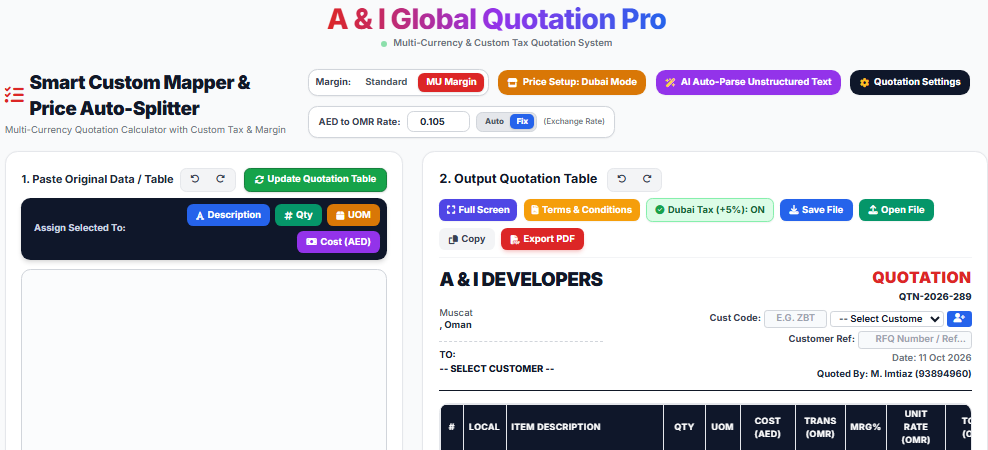
To fix this everyday procurement headache, I developed a simple, fast, and smart tool called A & I Global Quotation Pro on A & I Tools. It’s 100% free to use and built specifically to speed up your daily work.
What Makes A & I Global Quotation Pro So Helpful?
Instead of spending 20 to 30 minutes on a single quote, you can complete it in less than 2 minutes. Here is how it works:
1. Super-Fast Smart Data Mapping (Paste & Assign)
You don’t need to type everything manually into boxes. Simply copy your raw table or text, paste it into the box, select what you need, and click the quick buttons: Description, Qty, UOM, or Cost (AED). Hit Update Quotation Table, and it neatly fills your final quote table automatically!
2. AI Auto-Parse for Rough or Handwritten Notes
Got a messy email or a handwritten inquiry typed as text from a client? Just click the AI Auto-Parse button. The built-in AI reads the text, cleans it up, extracts the items, quantities, and prices, and places them directly into clean rows.
3. Real Profit Margin Calculation (MU Margin Engine)
Most standard calculators just add a basic percentage on top. Our tool includes a dedicated MU Margin Mode (true gross profit margin calculation dividing cost by 1 - Margin %), so your profit margins are always 100% accurate and protected.
4. Multi-Currency & Local Tax Made Simple
- Easily convert currencies (like AED to OMR exchange rates) with auto or custom fixed exchange rate controls.
- Turn local VAT (like Dubai +5% VAT) on or off with just one click depending on your client location.
5. Instant Branded PDF Download
Once your table looks good, add your client details, customize your Terms & Conditions, and click Export PDF. You get a clean, official, branded PDF ready to email directly to your client.
How to Make Your First Quote in 3 Easy Steps
- Paste & Map Your Data: Paste your text or table in the input box and use the quick mapping buttons (or click AI Auto-Parse for rough notes).
- Set Profit & Currency: Choose your margin calculation mode, exchange rate, and tax options.
- Export PDF: Check your live quote table and click Export PDF—done!
Try It Out Today
Elevate your commercial operations, speed up your workflow, and eliminate pricing mistakes today.
👉 Try it here for free: A & I Global Quotation Pro